
With a new group chat feature for ChatGPT that is now available, real-time collaboration, even more so than before, is taking on a different form, where users can now chat with the AI and each other in a group conversation that accommodates up to 20 users. The feature is available worldwide for Free, Go, Plus, and Pro users, and expands ChatGPT’s capability from a one-on-one chatbot-level experience to a shared workspace for multiple individuals to feel comfortable and share ideas together as a group.
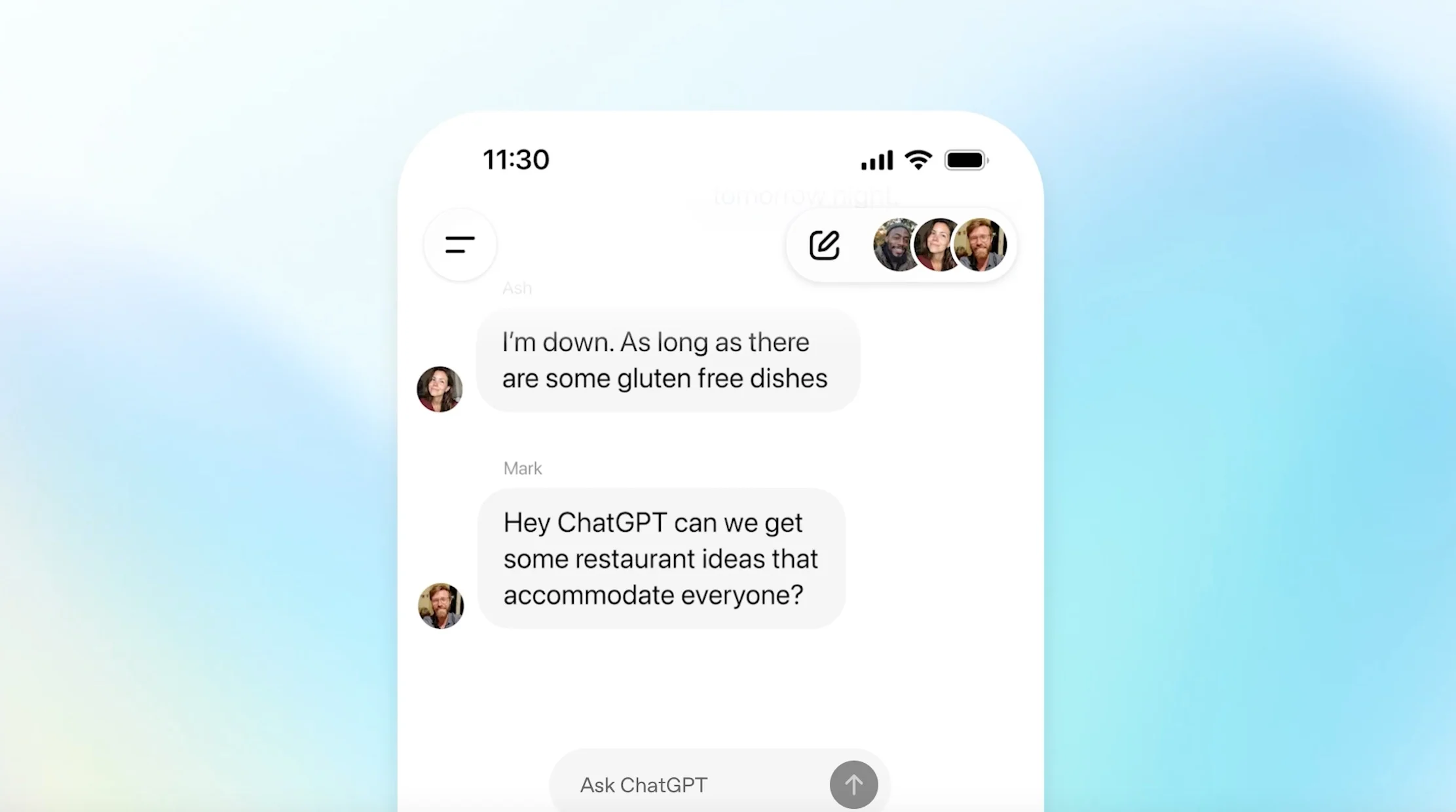
Group chats can be used to organize a project, plan a trip, brainstorm for a creative project, troubleshoot, or even make a decision. Working with the advanced AI moderation and privacy features of the update, participants and teams using group chat, from social to professional uses or everything in between, have the opportunity to work together virtually featuring connection, engagement, and content security.
Setting Up and Using ChatGPT Group Chats
Creating a chat group is easy:
- Users will click on the “people” icon in the ChatGPT app or browser to create the group.
- Creators can enter a name, create a group profile with a photo, then send invitation links via text message, email, or social media.
- Participants can include up to 20 members, each having an additional profile name and photo to customize the chat experience.
- Group chats are distinct from any one-on-one AI sessions. Your private chat history and previous AI memory will not be shared with others in the group.
Once a group chat is created, the group collaborates within a single conversational thread. ChatGPT listens quietly. ChatGPT will join the conversation if called upon directly with (“@ChatGPT”) or when it detects relevant pauses, disagreements, questions, or requests. ChatGPT will also respond with emojis or will generate images or memes on group suggestion prompts to make things more interactive.
How Interaction Works: AI’s Role and Social Behavior
OpenAI has designed ChatGPT’s behavior in group chats to be context-aware and socially intelligent:
- In a group context, ChatGPT typically only replies when it is mentioned or a consensus request is made, so it does not contribute to excessive interruptions or disruptions to the chat flow.
- In terms of conversational mode, the GPT-5.1 Auto will automatically select the most appropriate AI engine for the given prompt, while also avoiding conflicting demands for instant analysis versus longer evaluations.
- The ChatGPT provides ChatGPT responses that are counted against you user rate limits; group participants will have unlimited numbers of received responses back in messaging.
For fun and utility, ChatGPT can perform the following functions:
- Fact-check information
- Suggest plans or decisions
- Compiled visual and other design types of AI products or personalize responses as indicated by the user profile.
- Mediate debate and summarize group consensus.
Privacy, Moderation & Limitations
Privacy is an important part of any chat interaction:
All users are assured their personal ChatGPT memories are kept separate, never accessed and never stored in group chat.
The group chat data is kept separate from their private sessions, which minimizes the exposure of private or sensitive information.
In most group chats, moderation tools are to be provided concerning participants—-they can invite or disinvite participants easily, mute notifications and leave group chat at any time.
While some group chats may be available to all users, integration into enterprise-level chat groups is coming very soon. Once there, a more secure role-based approach will likely be provided although this is still an area of privacy controls for which the team is working—especially for professional staff and sensitive collaboration.
Practical Use Cases: Work, Study, and Socializing
Group Chat in ChatGPT is sufficiently flexible to support:
- Collaborative project/task management and document editing
- Study groups and discussions with AI suggesting Q and A and key concept reviews
- Travel or event planning and inviting friends to attend brainstorm sessions with new AI generated suggestions
- Group decision memory or debate and the “AI” summarizes and mediates definitions of the Bill of Rights or other studies
- Real-time multi-user chats that integrate images, code, and research outputs.
Overall, using ChatGPT group chats can provide a versatile eco-system for project teamwork and remote learning, the ability to extend teleworking for online community engagement.