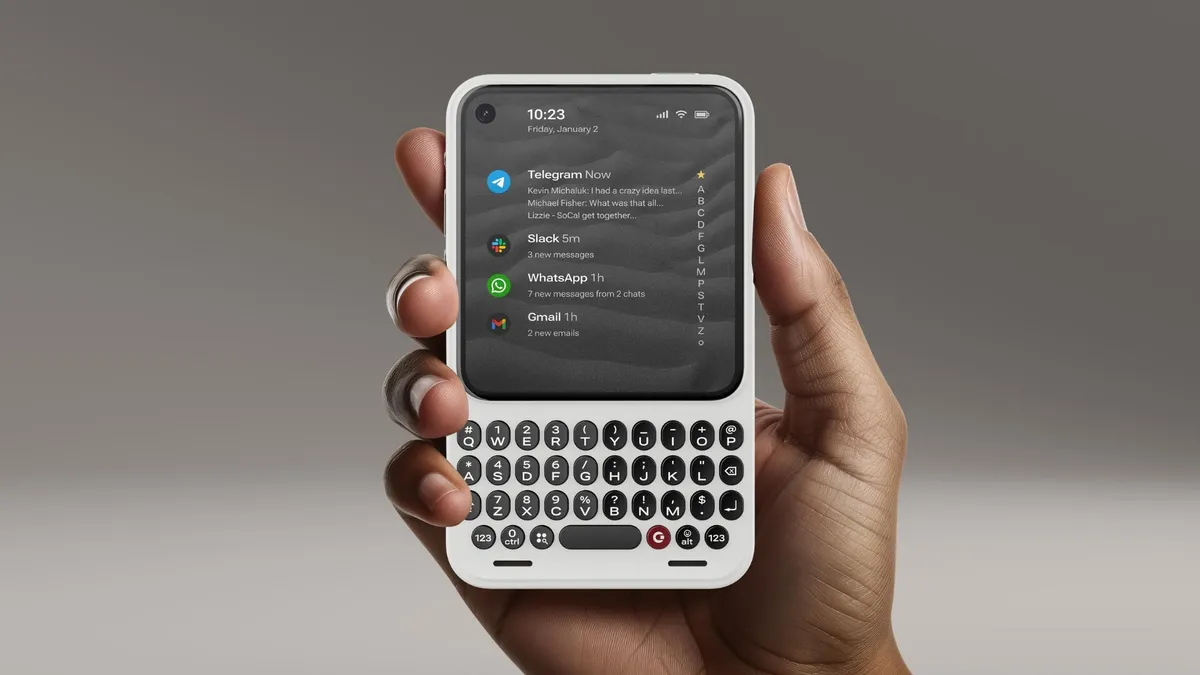
Clicks Technology is betting that the future of smartphones will sound more like a chorus of tiny key presses than silent glass taps. The startup that first made headlines in 2024 with a BlackBerry‑style keyboard case for the iPhone is back in the news in 2026, unveiling a family of accessories and even its own “mobile communicator” that double down on tactile typing in an era of all‑screen designs. From MagSafe‑style snap‑on keyboards with built‑in batteries to a second phone built for communication rather than endless scrolling, Clicks is trying to turn nostalgia for physical keys into a full‑blown product ecosystem.
Who is Clicks Technology?
Clicks Technology emerged from a very specific itch: the frustration of long‑form typing on glass and the nostalgia among power users for the precision of physical keys. The company’s founders include tech reviewer Michael Fisher (known as MrMobile), marketing veteran Jeff Gadway and former BlackBerry keyboard designers like Joseph Hofer, who brought decades of thumb‑typing ergonomics into the project.
Their first hit was the Clicks Keyboard Case, a wrap‑around accessory that turned an iPhone into something resembling a modern BlackBerry: the phone slid into a case with a backlit QWERTY keyboard attached to the bottom edge, freeing up screen space by keeping the virtual keyboard off the display. Reviews from outlets such as Tom’s Guide and Wired noted that while the case made the phone longer and top‑heavy, it felt solid, added grip, and delivered a surprisingly usable typing experience once muscle memory kicked in.
A year on, Clicks has expanded beyond that original niche into a broader vision: physical keyboards as modular companions for phones, tablets and even TVs, plus a purpose‑built device for people who want their phone to help them do more and doomscroll less.
The Power Keyboard: Snap‑on keys plus battery
The headline of Clicks’ latest announcement is the Power Keyboard, described as “a pocket keyboard designed for smart screens” that combines a physical keyboard and a power bank in one MagSafe‑style slab.
Key ideas:
- Magnetic, not a full case: Instead of sliding your phone into a shell, the Power Keyboard snaps onto the back using Qi2/MagSafe or compatible magnets, then slides out to reveal a compact physical keyboard when you need it.
- Universal compatibility: While Clicks started on iPhone, the new design is meant to work with “any device you want”, from Pixel 10 and Galaxy S25 phones to foldables and even tablets or TVs, connecting over Bluetooth instead of relying on Lightning or USB‑C passthrough.
- Built‑in battery: The unit doubles as a battery pack, topping up your device while you type, an acknowledgement that heavy keyboard users are often heavy battery users.
- Adjustable layout: The keyboard can fit comfortably under different phone sizes and orientations because it has multiple slider positions and can rotate to fit landscape mode. This is great for editing documents or long emails on the go.
Pre‑orders opened at $79, with a planned retail price of $109 and first shipments expected in spring 2026. The concept is clear: make the keyboard an optional layer you can add or remove, instead of a permanent case that doubles the length of your phone.
The Communicator: A “second phone” for doing, not doomscrolling
If the Power Keyboard is Clicks’ play for everyone, the Communicator is its manifesto. Announced at the same time, the Communicator is a standalone Android device that Clicks carefully avoids calling a “smartphone,” branding it instead as a “second phone built for communication, not consumption.”
According to launch materials:
- The Communicator integrates a hardware keyboard with a narrower, productivity‑oriented screen, evoking the spirit of classic Nokia Communicator and BlackBerry devices.
- Clicks’ messaging pitches it as an inbox‑first device for email, messaging and drafting, rather than an app casino optimized for infinite feeds.
- The software experience is reportedly pared back, with a focus on text, voice, and essential apps, speaking to users weary of distraction but unwilling to give up modern connectivity.
In interviews, co‑founder Fisher has framed the Communicator as a response to a decade of smartphones optimized for video and engagement: “a device built for doing, not doomscrolling.” It’s a small but notable challenge to mainstream phone makers, who have largely abandoned physical keyboards in favor of ever‑bigger, gesture‑driven slabs.
Why physical keyboards, and why now?
Clicks is tapping into a measurable undercurrent: plenty of users still miss the tactile, low‑error typing of BlackBerry‑era phones. Reviews of the original Clicks case highlight three recurring benefits:
- Accuracy over speed: Testers found that while their words‑per‑minute did not skyrocket on day one, autocorrect errors dropped, and long messages felt less fatiguing.
- More screen real estate: Because the hardware keyboard lives below the display, videos, documents, and chats can occupy the full screen instead of being squeezed above a virtual keyboard.
- Ergonomics and grip: Rubberized edges, vegan leather backs and carefully judged key domes make the phone feel more secure in the hand and more comfortable for extended thumb‑typing.
Clicks’ hardware is also informed by BlackBerry’s long obsession with keyboard feel. Joseph Hofer, a former BlackBerry engineer now working with Clicks, has described how lessons from classic QWERTY phones, key travel, spacing, and “click” sound, were carried into the new designs. The goal is to make typing feel intentional and almost mechanical, rather than like tapping on an unresponsive sheet of glass.
At a deeper level, the Communicator hints at a cultural moment: a segment of users is actively looking for ways to re‑tame their digital lives, swapping out endlessly scrollable feeds for devices that prioritize input (writing, coding, messaging) over consumption.
Limitations, trade‑offs and who Clicks is for
Even enthusiastic reviews acknowledge trade‑offs. The original Clicks case makes an iPhone “obscenely long,” as one reviewer put it, and can feel top‑heavy despite design tweaks in later revisions. Physical keys also demand relearning: long‑time glass typists need a week or more to hit their old speeds, and the layout can feel cramped to users with larger hands.
Battery‑and‑keyboard combos like the Power Keyboard add bulk and weight compared with slim MagSafe power banks, and the Bluetooth connection introduces another device to keep charged and paired. The Communicator, meanwhile, enters a niche and unforgiving market: secondary phones and minimalist devices have historically appealed to a small, passionate audience rather than the mainstream.
That said, Clicks is not trying to win everyone. Its natural audience includes:
- Professionals who write a lot on mobile, journalists, PRs, lawyers, field workers.
- Messaging‑heavy users who live in email, Slack, Signal or WhatsApp.
- Nostalgic BlackBerry fans and keyboard purists who never fully adapted to all‑screen devices.
- Digital‑minimalism enthusiasts who like the Communicator’s “doing, not doomscrolling” ethos.
By offering both snap‑on accessories and a dedicated device, Clicks is essentially segmenting that audience: those who want to augment a flagship phone and those ready to juggle a second, more focused communicator.
The bigger question: can Clicks change how we use our phones?
The story of Clicks Technology is not only about hardware nostalgia; it’s about challenging the idea that the smartphone’s evolution is finished. With the Power Keyboard and Communicator, the company is arguing that there is still room at the edges of the market for devices that prioritize input, accuracy, and intentionality over frictionless swiping.
Whether that bet pays off will depend on execution: build quality, software updates, battery life and how seamlessly the keyboards integrate with mainstream platforms like iOS and Android. Early reviews of the original case suggest that when Clicks gets it right, the experience can feel less like a gimmick and more like a genuine productivity tool.
For now, Clicks sits at an interesting junction in tech culture: between retro and futurist, between maximalist screens and minimalist intent. In a landscape of nearly identical glass rectangles, the sound of tiny keys clicking under thumbs may be a small but telling sign that some users want their phones to be less like televisions, and more like tools again.